Choosing the right software for your pool service company is one of those decisions that compounds over time. Pick the right tool and you'll save hours every week, get paid faster, and have the data you need to grow. Pick the wrong one and you'll spend months fighting the software instead of running your business.
This guide breaks down what to look for, what to avoid, and how the major options compare — so you can make an informed decision without sitting through six sales demos.
Three Approaches to Managing a Pool Business
Before diving into specific software, it helps to understand the three paths most pool companies take.
1. Spreadsheets and Paper
Plenty of solo operators start here. A Google Sheet for the route, a notebook in the truck, QuickBooks for invoicing. It works when you have 20-30 customers and a good memory.
The problems show up around 50 customers:
- Billing mistakes creep in. You forget to invoice a new customer for two months. You charge the wrong rate after a price increase. A customer cancels and you bill them anyway.
- Route planning is guesswork. You drive past three customers on the way to service one on the other side of town.
- No service history. A customer calls about a green pool and you can't remember the last time you tested their water.
- Scaling is impossible. When you hire your first technician, there's no system to hand them.
Spreadsheets cost nothing upfront, but the hidden cost in lost revenue, wasted drive time, and missed billing adds up fast. Pool service also carries real water-quality risk. The CDC documented 208 recreational-water-illness outbreaks from 2015-2019, dated December 31, 2019, which is a reminder that clean records and consistent service matter when a pool turns into more than a maintenance stop. That CDC benchmark is a useful way to think about the business: the operator opportunity is the large share of pools that never become a case study because someone kept the route, the chemistry, and the follow-up under control.
That same CDC record makes the argument for process even clearer. Most pools never turn into an outbreak story; they stay uneventful because the operator has a reliable system for tracking visits, chemistry, and follow-up. The goal is to keep every account in that category.
2. Generic Business Software
Some pool companies try to piece together general-purpose tools: QuickBooks for billing, Google Calendar for scheduling, Jobber or Housecall Pro for dispatching.
This works better than spreadsheets, but you end up with data scattered across three or four apps. Your customer list is in one place, billing is in another, and chemical readings are in a paper log or a separate app entirely.
The biggest pain point: none of these tools understand pool service workflows. You can't track chemical readings, manage recurring weekly routes, or generate pool-specific reports. You're bending the software to fit your business instead of the other way around.
That gap shows up when a simple service issue becomes a compliance or liability question. If a pool goes green or a customer asks about past treatment, you need visit history, chemical notes, and payment history in one place. When the records are split, the office spends more time reconstructing events than solving the problem. The CDC's outbreak data from December 31, 2019 makes that point plain: most pools never become the headline, but the ones that do usually expose missing history and weak follow-through.
3. Pool-Specific Software
Purpose-built pool service software handles everything in one place: scheduling, routing, billing, chemical tracking, customer communication, and reporting. The software already knows that pool service means weekly recurring routes, seasonal adjustments, and chemical compliance.
This is where tools like EZ Pool Biller, Skimmer, and Pool Brain live.
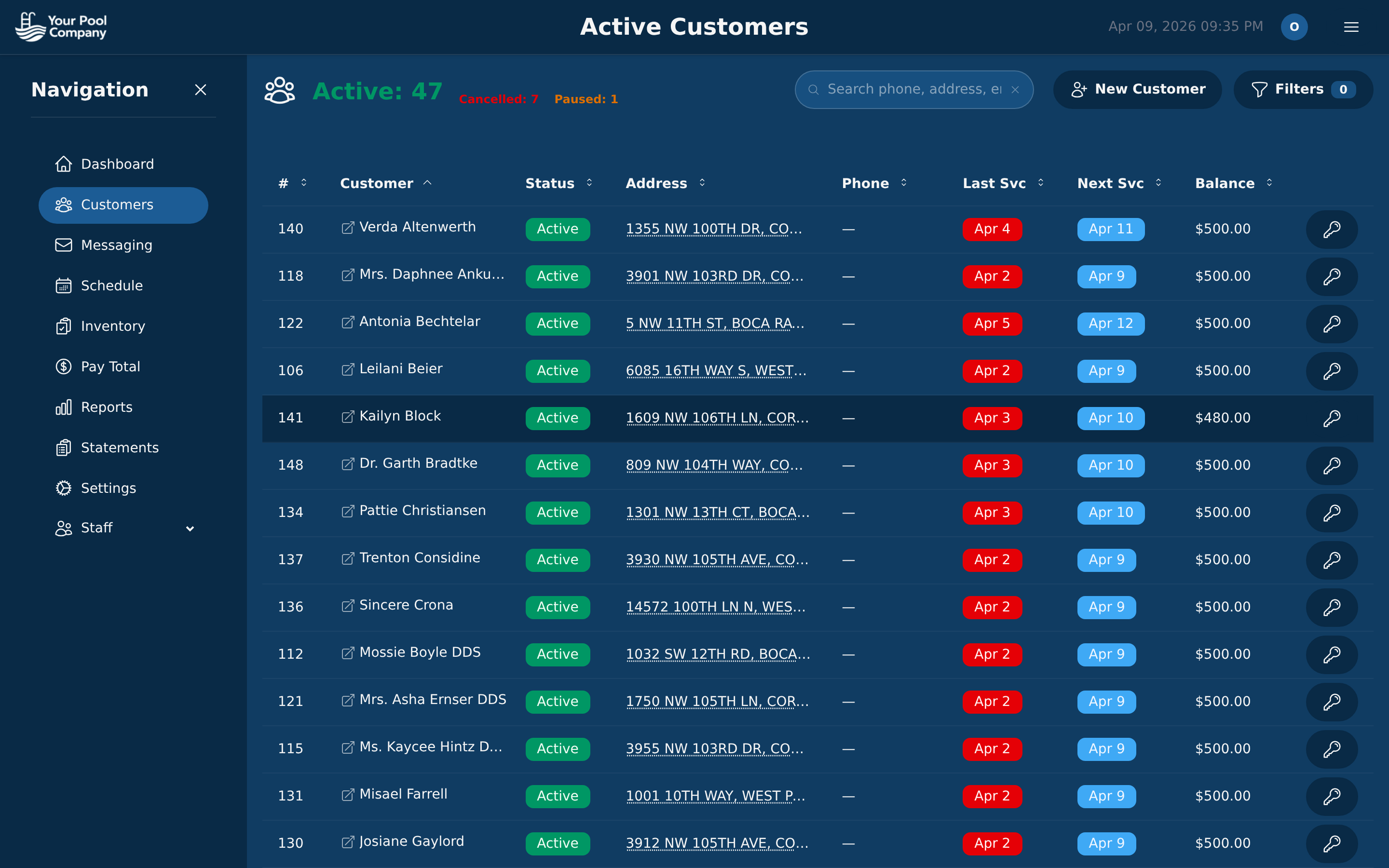 A pool-specific platform keeps your customers, billing, routes, and service history in one place.
When the platform is built for pool work, you stop stitching together separate systems and start running the business from one record. That matters when route changes, service notes, and payments all need to line up before the next stop. It also keeps the service record tied to the customer history, which is the difference between reacting to problems and preventing them.
Must-Have Features
When evaluating pool service software, these are the features that directly affect your revenue and efficiency. If a tool is missing any of these, keep looking.
Recurring Billing and AutoPay
Pool service is a subscription business. Your software needs to handle recurring charges automatically — generate the invoice, charge the card, send the receipt, record the payment. Every month, without you touching it.
Look for support for multiple payment methods (credit card, ACH/bank transfer, PayPal) and automatic retry logic for failed payments. A single failed payment that slips through the cracks can cost you a month of revenue from that customer.
For pool companies, the best workflow is statement-based. A running balance gives customers one place to see charges, payments, and credits instead of a stack of one-off invoices. That makes monthly billing easier to review, easier to collect, and easier to reconcile. It also fits the way pool work is actually delivered: recurring visits accumulate over time, so the statement tells the whole story in one place.
That same statement model matters when you look at the long tail of operations, not just the billing cycle. When records stay together, the office can answer questions faster, and the customer sees a clean history instead of disconnected charge events. It is one more reason pool-specific software beats a patchwork of generic tools.
Route Optimization
If you're servicing 15-25 pools per day, even small improvements in route order save meaningful time and fuel. Your software should optimize routes automatically based on customer locations, not just list them in the order you added them.
The difference between a manually ordered route and an optimized one is typically 30-60 minutes per day. Over a week, that's half a day you get back.
Route planning also affects service quality. When the day flows in a logical path, techs spend less time driving and more time on actual pool work. That gives them more room to handle surprises without throwing off the rest of the schedule.
Mobile App for Technicians
Your technicians need to work from their phones in the field. The mobile app should let them:
- View their daily route with turn-by-turn directions
- Log service completion with photos and notes
- Record chemical readings
- See customer-specific instructions
- Flag issues for the office to follow up on
If the mobile app is clunky or slow, your techs won't use it — and you'll lose the accountability and data that make the software worthwhile.
The app should also make it easy to connect service work to the customer record. When a technician can open the right stop, log the visit, and move on without juggling paper, the office gets cleaner data and fewer follow-up calls.
Chemical Tracking
Logging chemical readings (chlorine, pH, alkalinity, CYA, etc.) at every visit isn't optional — it's a liability protection and a customer retention tool. If a customer's pool goes green, your chemical history proves you were maintaining it properly.
Your software should store chemical readings per visit and make it easy to spot trends. Bonus points if it flags readings that are out of range.
This is where pool-specific software beats generic tools. A dedicated system turns chemical readings into usable history instead of scattered notes, so you can spot problems before they become service calls. That matters in the field and in the office, because clean records make it easier to answer questions before they turn into disputes.
QuickBooks Integration
Most pool companies use QuickBooks for accounting, taxes, and payroll. Your pool service software should sync with QuickBooks automatically — pushing invoices, payments, and customer data without manual double-entry.
If you're entering the same data into two systems, you'll eventually make mistakes and waste time reconciling them every month.
QuickBooks integration matters most when your billing and bookkeeping need to stay aligned. The fewer times your office has to retype customer data, the fewer chances there are for mismatched balances and cleanup later. It also keeps the accounting side from becoming a second system of record.
Nice-to-Have Features
These features aren't dealbreakers for every company, but they become important as you grow past 50-100 customers.
Payroll management keeps technician hours, pay per stop, and payroll reports in the same system, which saves you from maintaining a separate tool. Inventory tracking helps you monitor chemicals and parts so you know when to reorder before you run out mid-route. A customer portal lets customers view their service history, pay statements, and update payment methods without calling your office. Built-in route optimization is worth looking for if another platform charges extra for it. Mandatory photo prompts can improve quality control and make disputes easier to resolve.
As your operation gets larger, these extras stop feeling optional. They reduce office work, tighten communication, and give you a cleaner record of what happened at each stop. They also make it easier to prove what was done when a customer asks for the history behind a service issue.
Red Flags to Watch For
Not all pool service software is created equal. Watch out for these warning signs during your evaluation.
Per-User or Per-Technician Pricing
Some platforms charge per user. If you have three techs and an office manager, you're suddenly paying 4x the base price. This penalizes growth — the more your company grows, the more you pay, even if the software isn't doing more work.
Look for flat-rate pricing where you pay one price regardless of how many users or technicians you add.
Add-On Fees for Core Features
Watch out for platforms that advertise a low base price but charge extra for features you'll actually need:
- Route optimization as a paid add-on
- Chemical tracking as a separate module
- Customer portal behind a premium tier
- SMS notifications at per-message rates
Add up the total cost with every feature you need, not just the advertised starting price.
This is where a feature checklist helps. If a tool makes you buy basic workflows one by one, the sticker price stops meaning much. By the time you add the pieces that run your business, the monthly bill can look very different. The real question is whether the software helps you run the route, the statement cycle, and the office without surprise charges.
No Data Export
If you can't export your customer list, billing history, and service records, you're locked in. Always confirm you can get your data out in a standard format (CSV, at minimum) before committing to a platform.
Data portability matters because your business changes. If you switch software later, you should be able to move records without rebuilding months of history by hand.
Long-Term Contracts
Pool service software should earn your business every month. Be wary of platforms that require annual contracts or charge early termination fees. If the software is good, you'll stay without a contract.
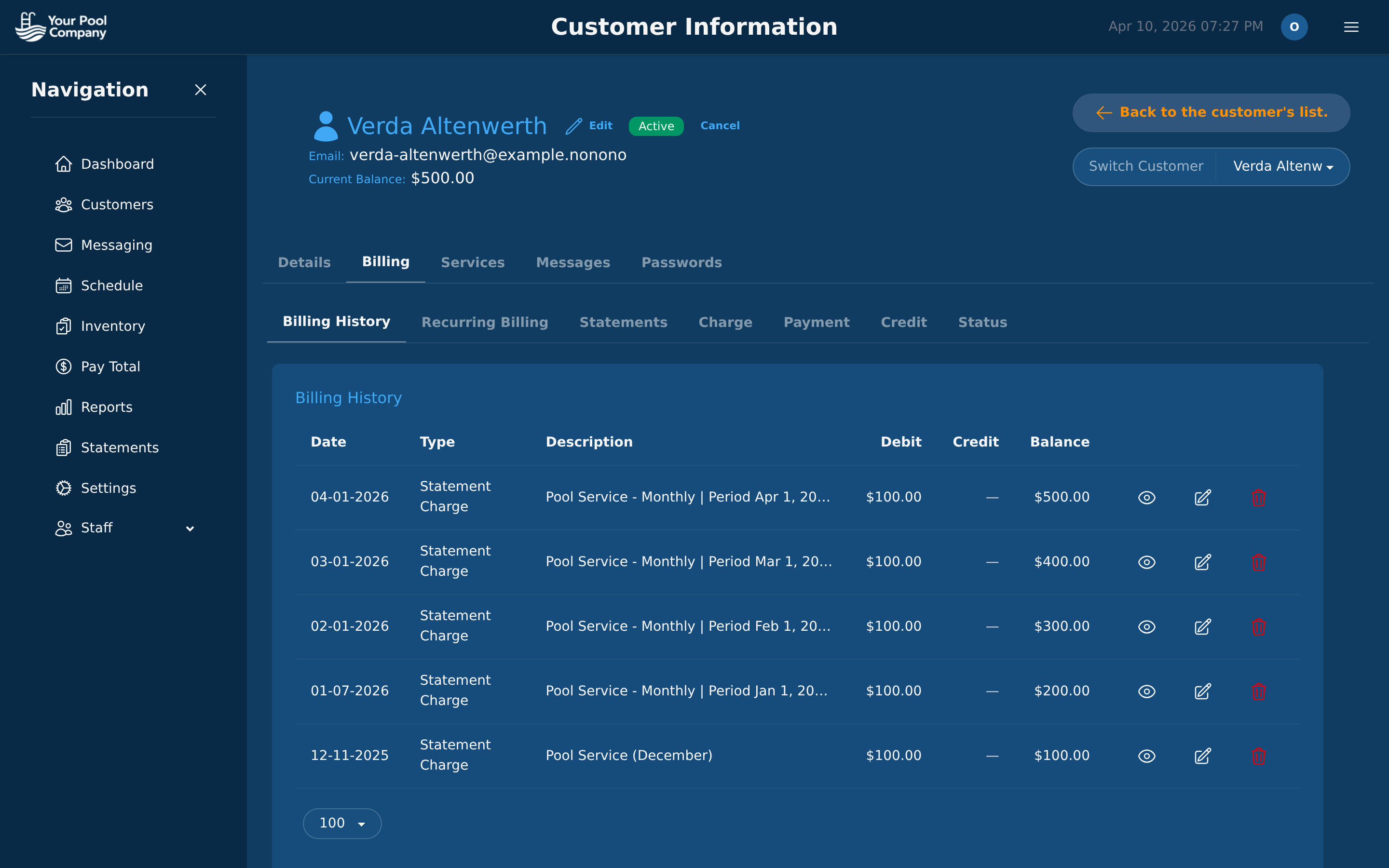 Your billing history should be transparent and exportable — no locked-in data.
Pricing Comparison: What You'll Actually Pay
Here's how the major pool-specific platforms compare on cost as of early 2026.
| Feature | EZ Pool Biller | Skimmer | Pool Brain |
|---|---|---|---|
| Base price | $35/mo | $98/mo | $65/mo |
| Extra locations | $0.50 each | $2.00 each | $1.00 each |
| Users included | Unlimited | Varies by plan | Varies by plan |
| Route optimization | Included | Paid add-on | Included |
| Chemical tracking | Included | Included | Included |
| Payroll | Included | Not available | Not available |
| QuickBooks sync | Included | Paid add-on | Included |
| Customer portal | Included | Limited | Included |
| Contract required | No | No | No |
For a company with 100 service locations, the annual cost difference is significant:
- EZ Pool Biller: $35/mo base + (100 x $0.50) = $85/mo ($1,020/year)
- Pool Brain: $65/mo base + (100 x $1.00) = $165/mo ($1,980/year)
- Skimmer: $98/mo base + (100 x $2.00) = $298/mo ($3,576/year)
That's a $2,556/year difference between the least and most expensive option — and EZ Pool Biller includes features (payroll, route optimization, QuickBooks sync) that cost extra or aren't available on the others.
For a detailed head-to-head breakdown, see our EZ Pool Biller vs Skimmer comparison.
How to Evaluate: A Practical Checklist
Don't rely on feature lists alone. Here's how to actually test whether a platform works for your business.
1. Set Up a Real Customer
Create a customer with the same service schedule, pricing, and notes you'd use in your business. If the setup process is confusing or takes more than two minutes, that friction will multiply across hundreds of customers.
2. Run a Billing Cycle
Set up a recurring charge and see how billing works end-to-end: charge generation, payment processing, receipt delivery, and reporting. Check that failed payment handling (retry, notification) works automatically.
3. Use the Mobile App in the Field
Have a technician (or yourself) use the mobile app for a full day of service. Is it fast? Does it work on spotty cell service? Can you log a visit in under 30 seconds?
4. Check the Reports
Pull a revenue report, a customer aging report, and a route efficiency report. If the data you need for monthly business decisions isn't available or requires manual calculation, the software isn't doing its job.
5. Test the Migration Path
Ask how customer data, billing history, and routes get imported. The best platforms offer free data migration assistance. If you have to re-enter 200 customers by hand, factor that time into your decision.
Making the Switch
If you're currently on spreadsheets or a generic tool, the best time to switch is at the beginning of a billing cycle — typically the first of the month. This gives you a clean cutover point.
If you're switching from one pool-specific platform to another, look for a provider that handles data migration for you. EZ Pool Biller offers free data transfer from Skimmer, Pool Brain, and other platforms — most companies are fully migrated and running within 30 minutes.
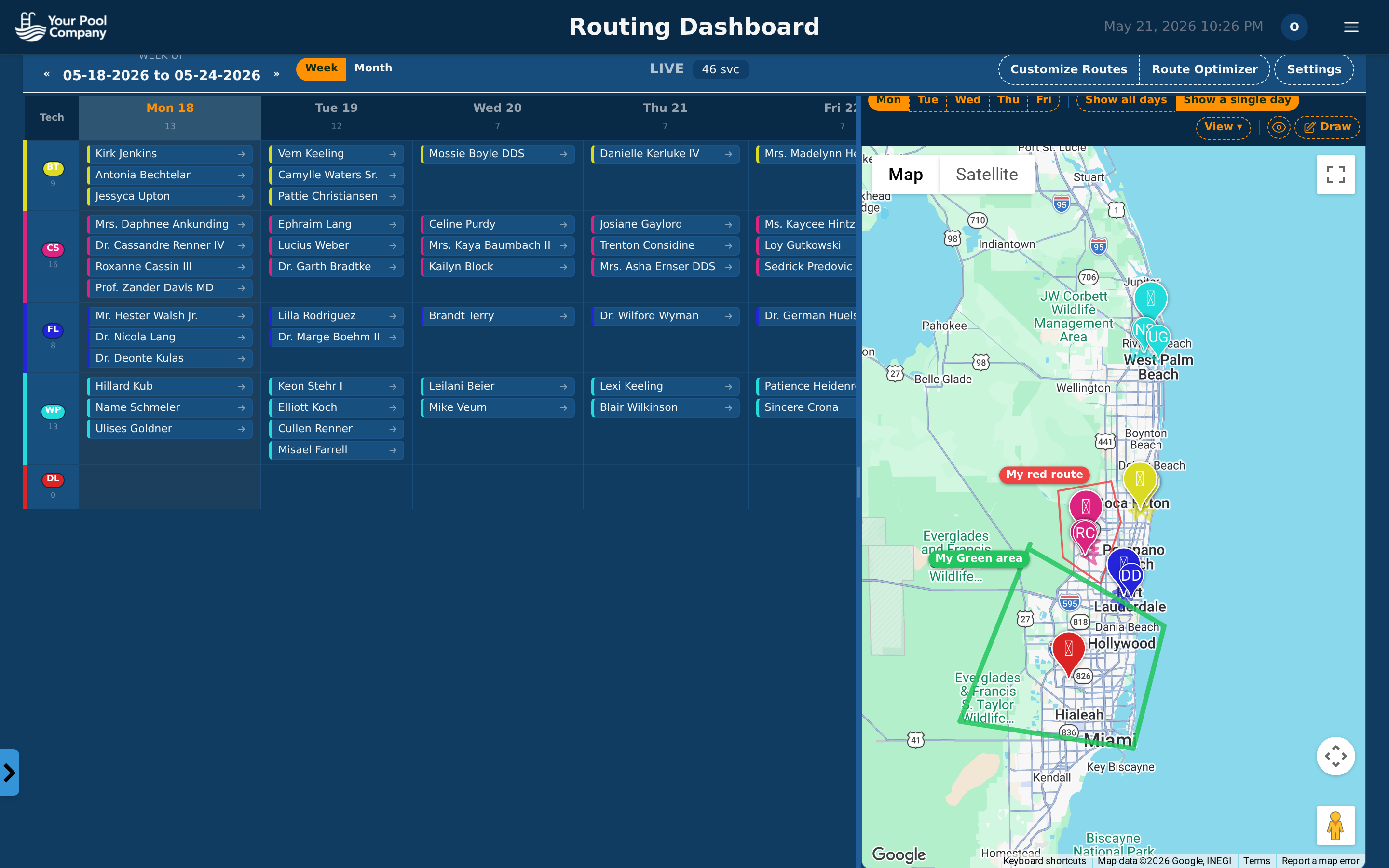 A clean schedule view makes it easy to see your week at a glance after migrating.
The Bottom Line
The right pool service software pays for itself in the first month through faster billing, fewer missed charges, and more efficient routes. The wrong software costs you time and money every week you use it.
Focus on the must-haves (recurring billing, route optimization, mobile app, chemical tracking, QuickBooks sync), watch out for hidden fees and add-on pricing, and take the time to test before you commit.
If you want to see how EZ Pool Biller handles all of this at $35/mo with no add-on fees, start a free trial or check out the full feature list and comparison page.
Frequently Asked Questions
When should a pool service company stop using spreadsheets and paper? You should start looking for dedicated software once you have enough customers that billing mistakes, route inefficiency, or missing service history start costing you money. Spreadsheets can work for a small operation, but they break down as your customer count grows and you bring on technicians. If you are spending too much time fixing invoices, guessing routes, or trying to remember service details, it is time to move on.
Why is generic business software not enough for pool service operations? Generic tools can cover pieces of the job, but they leave your data scattered across multiple apps and paper logs. That creates extra work for scheduling, billing, and tracking chemical readings because the software does not understand pool service workflows. You need a system built to handle recurring routes, service history, and pool-specific reporting without forcing you to patch everything together.
What are the main problems pool companies face when they keep customer and service data in separate systems? The biggest issue is that important information becomes hard to find when you need it. If billing is in one place, scheduling in another, and chemical readings somewhere else, you are more likely to miss invoices, lose service history, or make decisions without full context. That slows down your team and makes it harder to run the business consistently.
What should you look for in software if you want to grow beyond a solo operation? Look for software that can handle recurring weekly routes, store service history, and keep your billing and scheduling connected in one system. You also want tools that support technician handoff so new staff can work from an established process instead of starting from scratch. The right platform should save time, reduce mistakes, and give you the information you need to scale.